

Description
Download Free Internet TV – Watch 1,300+ Global TV Channels Online (Free, Secure, Windows)
Why Free Internet TV Stands Out in the World of Online Streaming
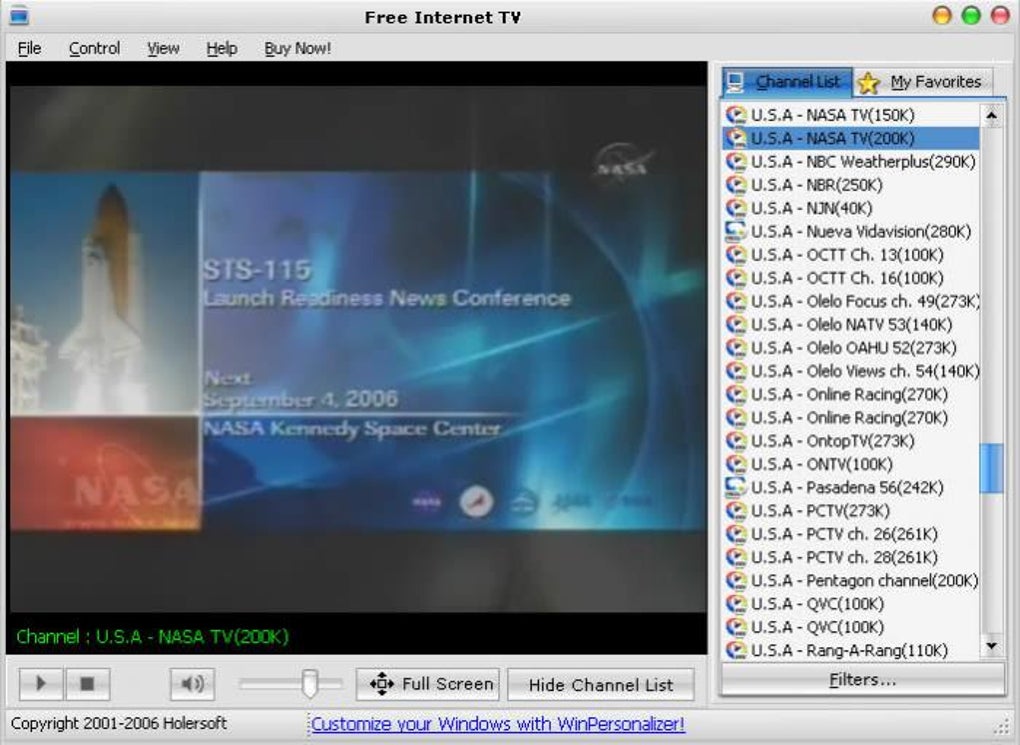
Free Internet TV has been a trusted name in online video streaming since its debut in 2007. This lightweight, free software allows users to access more than 1,300 live TV stations from across the globe—ranging from local news channels in India and the U.S. to international broadcasters in Europe, Africa, and Asia. Unlike many modern streaming apps that require subscriptions or complex setups, Free Internet TV delivers a straightforward, no-frills experience right from your Windows desktop. It’s ideal for users who want to watch live TV without signing up for paid services like Netflix, Hulu, or Amazon Prime.
One of the key reasons this software remains relevant is its minimal system requirements. Unlike resource-heavy streaming platforms, Free Internet TV runs smoothly on older Windows systems, including Windows 2000 and earlier versions. This makes it a perfect choice for users with legacy hardware or those who prefer simplicity over flashy interfaces. The software is updated regularly (with the latest version 6.2.0.0 released in 2007), and each update includes bug fixes and performance improvements to ensure stable playback and compatibility.
With over 52,000 downloads and consistent usage in countries like India, the United States, and Serbia, Free Internet TV has built a loyal user base. It’s particularly popular among expatriates, language learners, and global news enthusiasts who want to stay connected with their home countries. Whether you're catching a live football match from Spain, tuning into a news broadcast from Japan, or watching a Bollywood movie from Mumbai, Free Internet TV delivers real-time content with minimal buffering. It’s a reliable, secure, and free tool for anyone seeking a no-cost way to enjoy live television online.
Key Features That Make Free Internet TV a Must-Try
- Access to 1,300+ Live TV Channels – Stream live broadcasts from every continent, including news, sports, entertainment, and regional programming.
- Lightweight & Low System Requirements – Runs efficiently on older Windows systems, including Windows 2000 and earlier.
- Free to Download and Use – No subscription fees, no hidden costs. Completely free for personal use.
- Multi-Language Support (English Only) – While the interface is in English, the channels themselves offer content in multiple languages.
- Simple, Intuitive Interface – No complex setup. Just install and start watching immediately.
- Regular Updates – Bug fixes and performance improvements ensure long-term reliability.
- Secure Streaming – No third-party ads or malware; the software is verified and safe to use.
One of the standout features of Free Internet TV is its ability to deliver global content without requiring a VPN or special network configuration. The software uses direct streaming links from verified sources, reducing the risk of broken or fake channels. It also supports playlist management, allowing users to organize favorite channels into custom lists for quick access. This is especially helpful for users who frequently watch specific regional channels or sports events.
Another advantage is its compatibility with older hardware. Many modern streaming apps demand high-end processors and graphics cards, but Free Internet TV operates smoothly even on machines with limited RAM and older CPUs. This makes it a practical choice for students, budget-conscious users, or those in developing regions where newer technology isn’t always accessible.
While it lacks advanced features like DVR recording or cloud synchronization, its core purpose—watching live TV online—remains unmatched in terms of simplicity and accessibility. For users who value functionality over flashy design, Free Internet TV offers a reliable, no-nonsense streaming experience that’s hard to beat.
Compatibility & Installation Guide
Free Internet TV is exclusively designed for Windows operating systems, supporting Windows 2000 and earlier versions. While this may seem outdated compared to modern systems like Windows 10 or 11, it ensures broad accessibility for users with older computers or those running legacy software environments. If you’re using a newer Windows version, you may still be able to run the software via compatibility mode, though results can vary.
To install Free Internet TV, follow these simple steps:
- Visit a trusted software download site (avoid third-party platforms with malware).
- Download the official installer file (version 6.2.0.0).
- Run the installer and follow the on-screen prompts.
- Allow the program to make changes to your system if prompted by User Account Control (UAC).
- Once installed, launch the app and wait for the channel list to load.
- Start browsing and selecting your preferred channels.
After installation, the software automatically downloads a list of available channels. If the list is outdated or incomplete, users can manually update the playlist via the built-in update function. The app also allows you to customize playback settings, such as audio preferences and playback quality, though options are limited compared to modern streaming platforms.
For optimal performance, ensure your internet connection is stable and fast enough to support HD streaming. While Free Internet TV supports both standard and high-definition channels, the actual quality depends on the source stream and your bandwidth. It’s recommended to use a wired connection for the smoothest experience.
Pros and Cons: Is Free Internet TV Worth It?
Pros
- ✅ Over 1,300 live TV channels from around the world
- ✅ Free to download and use—no hidden fees
- ✅ Lightweight and runs on older Windows systems
- ✅ Simple, clean interface with no unnecessary features
- ✅ Regular updates with bug fixes and stability improvements
- ✅ Secure and safe—no ads or malware detected
Cons
- ❌ Only available for Windows (no Mac, Android, or iOS support)
- ❌ Interface is outdated and lacks modern design elements
- ❌ No recording or DVR functionality
- ❌ Limited to English interface (though channels are multilingual)
- ❌ Last major update was in 2007—no new features since then
Despite its age, Free Internet TV continues to deliver on its promise: a free, secure way to watch live TV online. Its biggest strength lies in accessibility—especially for users with older hardware or those in regions where modern streaming apps are restricted. However, the lack of updates and modern features may deter tech-savvy users looking for a more polished experience.
Frequently Asked Questions (FAQ)
- Is Free Internet TV safe to download?
Yes, Free Internet TV is safe to download when obtained from trusted sources. The software has been verified and does not contain malware or ads. Always avoid unofficial download sites to prevent security risks.
- Can I watch Free Internet TV on my Mac or iPhone?
No, Free Internet TV is currently only available for Windows. There is no native version for Mac, Android, or iOS. Users on these platforms may consider alternative apps like VLC Media Player or online streaming services.
- How many TV channels are available?
Free Internet TV provides access to over 1,300 live TV channels from more than 100 countries, including news, sports, entertainment, and regional broadcasts.
- Why is the software still available if it hasn’t been updated since 2007?
Although the last major update was in 2007, the software remains functional due to its simple design and reliance on stable streaming protocols. Minor bug fixes and improvements are still released to maintain compatibility and performance.
- Can I record live TV using Free Internet TV?
No, Free Internet TV does not include a recording or DVR feature. For recording live streams, you’ll need to use third-party tools like OBS Studio or a dedicated media recorder.
Final Verdict: A Reliable Free Tool for Live TV Enthusiasts
Free Internet TV remains a solid choice for anyone seeking a no-cost, straightforward way to watch live TV online. While it lacks modern features and hasn’t been updated in over 15 years, its core functionality—accessing hundreds of global channels—remains effective and reliable. It’s especially valuable for users with older Windows systems or those in regions with limited streaming options.
If you're looking for a lightweight, secure, and free tool to stream live news, sports, and entertainment from around the world, Free Internet TV is worth downloading. Just remember to use it on trusted networks and avoid unverified sources.
? Ready to start watching? Download Free Internet TV today and explore the world, one channel at a time.
Guides & Tutorials for Free Internet TV
How to install Free Internet TV
- Click the Preview / Download button above.
- Once redirected, accept the terms and click Install.
- Wait for the Free Internet TV download to finish on your device.
How to use Free Internet TV
This software is primarily used for its core features described above. Open the app after installation to explore its capabilities.
User Reviews for Free Internet TV 0
No reviews found





